sparkles:hue
sparkles:hue (the hue command) is an interactive syntax-highlighting file viewer, live theme previewer, grammar-aware diff engine, and pull request inspector powered by sparkles:syntax and tree-sitter.
It renders source code and documents across four distinct backends: non-interactive ANSI color streams, an interactive terminal TUI, standalone HTML (with pure CSS hover overlays), and a hardware-accelerated GUI window featuring rich Markdown previews (rendered in the style of render-markdown.nvim).
Ways to Run hue
| Method | Command | Description |
|---|---|---|
| Install with Nix | nix profile add github:PetarKirov/sparkles#hue | Installs hue into $PATH (Linux & macOS). Manage with nix profile {upgrade,remove} hue. |
| Run without installing | nix run github:PetarKirov/sparkles#hue -- <args> | Runs hue directly without installing (or nix run .#hue -- <args> inside repository). |
| Ad-hoc shell | nix shell github:PetarKirov/sparkles#hue | Starts an ephemeral subshell with hue available in $PATH. |
| Nix dev shell | dub run :hue -- <args> | Standard development workflow inside nix develop. |
Quick Start
# View source code or markdown (view is the default subcommand)
hue path/to/file.d                       # opens GUI window on desktop; falls back to TUI in SSH/headless
hue view file.d --tui                    # force interactive terminal viewer (alias: --no-gui)
hue view file.d --html > output.html     # self-contained static HTML
hue view file.d | cat                    # piping automatically emits ANSI color stream

# Compare files, git revisions, or staged changes
hue diff file1.d file2.d                 # side-by-side or unified diff
hue diff --staged                        # git staged changes
hue diff HEAD~1..HEAD --diff-layout split

# Inspect pull requests with review comments
hue pr 123                               # by PR number
hue pr owner/repo#123                    # by repo and number

# Build static HTML syntax galleries
hue gallery ./fixtures --out ./html

# Inspect themes and configuration
hue theme --list                         # list 36+ built-in color themes
hue config show                          # display resolved settings and origins
Subcommands & Features
hue provides dedicated subcommands for distinct viewing, diffing, and inspection workflows:
hue view (Default)
Syntax-highlights and inspects files, directories, stdin (-), URLs, or twoslash annotations. When no subcommand is given, hue defaults to view.
hue view src/app.d                       # open file
hue view src/ --tree-depth 3             # open directory tree explorer
cat file.d | hue view - --lang d         # read from standard input with explicit syntax
hue view file.d --line 42 --column 10    # jump directly to line/column
hue view file.d --find "struct Foo"      # jump to search match
Key options:
- Language / Syntax:
--language <lang>/--lang <lang>to specify syntax language (e.g.d,rust,python,json,c), essential when reading from stdin (-). - Navigation:
--line <n>,--column <c>,--find <pattern>,--search <pattern>. - Display:
--line-numbers/--no-line-numbers,--tab-width <n>,--code-overflow <scroll|wrap|wrap-at:N>,--code-max-lines <n>,--table-overflow <scroll|wrap|wrap-at:N>,--table-max-lines <n>. - Markdown:
--markdown(force markdown rendering) or--raw(force raw source view). - Directory Explorer:
--tree-width <cols>,--tree-depth <n>,--tree-hidden,--tree-exclude <glob>.
The interactive raw source view preserves each source line's full cell width. Wide lines scroll horizontally rather than reflowing; the gutter stays pinned, and character selections use the same retained geometry as painting.
hue diff
Grammar-aware text and structural diff engine across file pairs, working directory changes, or git revisions.
hue diff old.d new.d                                    # diff two files
hue diff --staged                                       # diff git staged changes
hue diff HEAD~3..HEAD                                   # diff git commit range
hue diff old.d new.d --diff-layout split                # side-by-side 2-column view
hue diff old.d new.d --diff-structural auto             # grammar-aware structural diff
hue diff old.md new.md --diff-preview                   # diff rendered Markdown
hue diff old.d new.d --diff-ignore-whitespace change    # ignore whitespace changes
hue diff old.d new.d --diff-show-formatting             # expand whitespace-only hunks
hue diff old.d new.d --no-diff-chrome --width 40        # bare rows, at a fixed width
Diff controls:
--diff-layout <unified|split>: Choose unified single-column or side-by-side 2-column layout.--diff-structural <auto|on|off>: Grammar-aware CST diffing that isolates semantic changes from formatting noise.--diff-commutative <mode>: Suppresses non-breaking reorder noise in unordered containers (e.g. sorted D imports).--diff-preview: Diffs rendered Markdown documents instead of raw markdown text.--diff-ignore-whitespace <exact|trailing|change|all>: Whitespace sensitivity mode.--diff-show-formatting: Show whitespace-only hunks in full instead of folding them to a badge. The fold is right for review — a reviewer scanning a PR does not want to read re-indentation — but wrong when the whitespace is the subject, as when diffing a formatter's output, and a one-shot--ansirender has no keystroke to expand it with.--diff-context <n>: Unchanged lines kept around each hunk (default 3). Pair it with--no-diff-chrome, whose suppressed bands would otherwise be the only sign that anything was elided.--no-diff-chrome: Drop the file header, the@@hunk bands and the⋯ N unchanged linestrailers, leaving only the rows. For an embedder whose own frame already says which file and which region it is showing — pair it with--no-line-numbers. An expanded context region is content, not chrome, and stays.
Two options apply to any one-shot render, not just diffs:
--width <n>: Lay out in this many columns instead of asking the terminal. A pipe has no size to report, so without this a redirected render falls back to 80 columns however wide the pane receiving it is.--height <n>: Fill at least this many rows, padding shorter content. The padding is painted like the rest of the render, which is what an embedder placing two renders side by side needs — padding them itself would leave the added rows blank inside an otherwise filled pane.--background <no-background|spans|full>: How the theme's background paints.no-backgroundleaves the terminal's own background showing, which is what a pane composed into someone else's frame wants.
hue pr
Inspect GitHub and GitLab pull requests read-only directly from your terminal or GUI window, complete with file trees, diff hunks, and inline reviewer discussion threads.
hue pr 123                               # current repository PR #123
hue pr PetarKirov/sparkles#309           # specific repository PR
hue pr https://github.com/owner/repo/pull/123
hue pr 123 --gui                         # open PR in GUI window
hue gallery
Batch-renders entire source trees or fixture directories into a browsable static HTML syntax gallery.
hue gallery ./examples --out ./dist/gallery
hue gallery ./docs --markdown --theme catppuccin-mocha
hue theme
Inspect, list and export color themes. hue ships with 36 dark and light themes (including tokyo-night, catppuccin-mocha, nord, gruvbox-dark, github-light, and dracula), and reads your own as a theme file: a Design Tokens document (.tokens) that can overlay a built-in and change only what it names.
hue theme --list                         # list all available themes
hue theme tokyo-night                    # inspect palette colors of a theme
hue theme nord --export > mine.tokens    # a theme as a file, to edit
hue view file.d --theme catppuccin-latte # apply a built-in theme to view
hue view file.d --theme ./mine.tokens    # or a theme file
A theme file that names a base keeps everything else from it:
{
  "$extensions": {
    "dev.petar-kirov.sparkles": { "base": "nord", "name": "mine" }
  },
  "syntax": { "keyword": { "fg": { "$type": "color", "$value": "#ff0066" } } }
}
The format and its rules are the design system's theme file specification.
hue overlay
Inspect registered document overlay engines (such as TypeScript/D twoslash type queries, code coverage overlays, and execution traces).
hue overlay --list                       # list registered overlay kinds
hue overlay twoslash                     # inspect twoslash overlay capabilities
hue config
Display and diagnose effective application configuration, font fallbacks, and theme settings.
hue config show # show effective configurationOutput Rendering Sinks & Automatic Detection
When no explicit backend flag is provided, hue automatically picks the best sink for your current environment:
- GUI Window (
--gui): Opened automatically when a graphical display is present and stdout is a terminal (standard interactive desktop session). Features hardware acceleration, rich Markdown previews, customizable fonts, and mouse-hover inspection cards. - Interactive Terminal TUI (
--tui/--no-gui): Chosen automatically in headless or remote SSH sessions where stdin and stdout are terminals but no graphical display is available. Includes pane splitting, tree navigation, mouse support, and interactive key guides. - Non-interactive ANSI (
--ansi): Emitted automatically whenever stdout is piped or redirected (e.g.hue file.d | catorhue file.d | less -R), or when reading non-interactive stdin. - Standalone HTML (
--html): Emits a self-contained, zero-JavaScript HTML document with CSS token styling and interactive CSS-only hover popups.
Global & Appearance Options
Universal options can be passed to any hue command:
--theme <name|file>: Select the color theme, a built-in name or a theme file (default:tokyo-night).--background <full|soft|none>: Background fill mode.--log-level <trace|info|warning|error|critical|off>: Logging verbosity (default:warning).--overlay <kind>[=<artifact>]: Attach one or more overlay payloads (e.g.--overlay twoslash=nodes.json).--font <family-list>: Font family fallback chain for GUI mode.--font-size <pt>: GUI font size in points.--window-width <px>,--window-height <px>: GUI initial window dimensions.
Twoslash Overlays
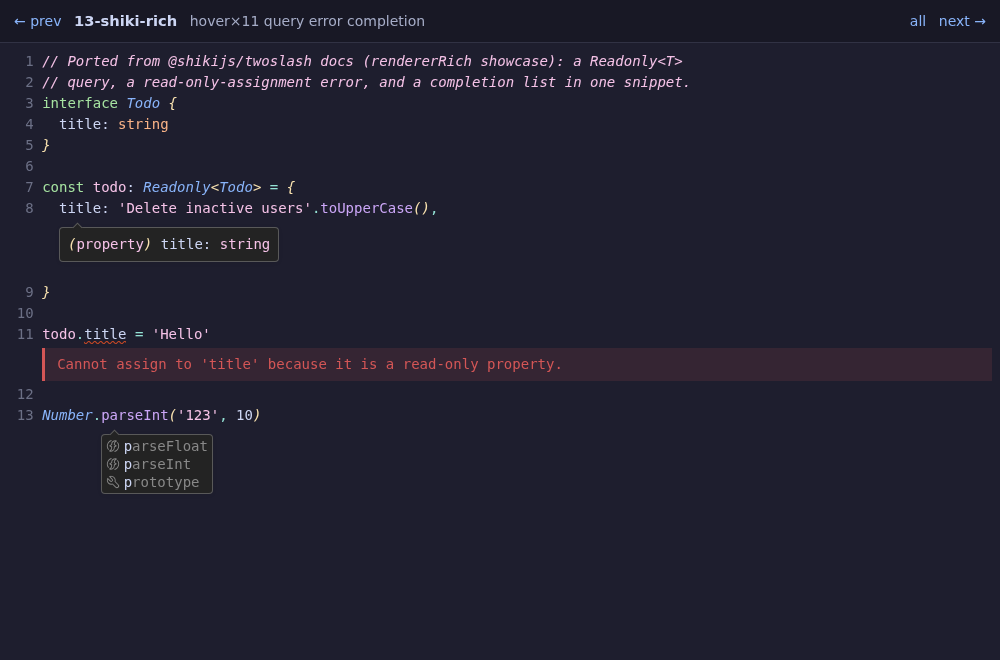
hue can render TypeScript and D Twoslash type-annotation models as rich overlays — including type hovers (^?), completion lists (^|), compile errors, and custom @tags — across HTML, ANSI, and GUI modes:
# View twoslash payload with type overlays in terminal or GUI
hue view sample.twoslash.json --twoslash
hue view sample.d --overlay twoslash=sample.twoslash.json --gui
hue view sample.twoslash.json --html > snippet.html
Live D types and the dub configuration
Opening a .d file in the terminal workspace or the GUI starts a live analysis of it, which describes one build of its dub package. To choose which, press <space>cc. It lists the configurations the package's recipe declares, previews each where it is declared, and marks the one in effect; default hands the choice back to dub. Accepting a row restarts the analysis with that configuration.
The choice is per package, so gpu-effects for libs/ui leaves every other package alone. It is kept in .sparkles/hue/project.json at the project root (the nearest directory holding .sparkles, else .git), over the global dub section of the settings:
{
  "dubPackages": {
    "libs/ui": {
      "config": "gpu-effects"
    }
  }
}
Interactive Showcase
Hover over dotted-underline tokens to inspect type popups: